
 Popular
 Games
Games



































Cell Machine Unblocked
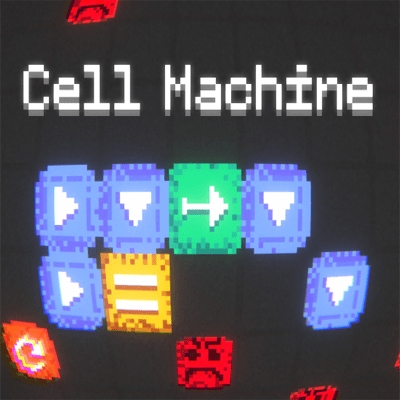
Cell Machine inverts the puzzle formula. Instead of controlling pieces in real-time or making moves one after another, you build a cellular automaton by arranging cells on a grid and then press play to watch your creation unfold. The game runs automatically—each cell follows its own simple rule, but combined they produce emergent behavior you could not have predicted from any single rule. Your job is to set up the initial conditions so that by the time the simulation finishes, the enemy cell gets hit.
The brilliance lies in the constraint. Six cell types—Movers, Rotators, Generators, Sliders, Pushes, and Immobiles—each do one thing well. A Mover walks in a direction. A Rotator spins adjacent cells 90 degrees. A Generator duplicates. When you place them on a grid and press play, you cannot change anything. The simulation evolves according to fixed rules, and you either succeeded in your setup or you did not. That finality is freeing. There is no second-guessing mid-game, no panic pivot. The puzzle either works or it doesn't, and you learn from it immediately.
Cell Machine rewards both intuition and tinkering. Early levels feel like discovery—you learn what each cell does by watching it interact with others. As you progress, you realize that a simple chain of movers can push a rotator into position, which can spin a generator to aim it, which can flood the grid with new cells that converge on the enemy. Each level is a small physics problem with exactly the cells you need to solve it. The challenge is figuring out which arrangement actually works.
The game does not penalize you for failing a configuration—you try again instantly with a new setup. That low friction keeps iteration smooth. Many solutions exist for each level, so there is room for creative thinking. Some players find elegant minimal solutions; others create chaotic chains that somehow work anyway. Cell Machine celebrates both approaches because what matters is understanding the rules well enough to architect emergent behavior.
The visual feedback is instant and clear. You watch cells move, spin, duplicate, and collide. When an arrangement does not work, it is obvious why. That clarity makes learning efficient. You do not have to wonder if you made a mistake—you see exactly what happened and can adjust your next attempt accordingly.
Cell Machine is hypnotic because every solution feels like a small victory. Setting up a complex chain and watching it execute perfectly delivers genuine satisfaction. The game respects your intelligence by letting you figure out solutions without hand-holding, yet the rules are simple enough that progression feels earned rather than lucky.
How to play Cell Machine
Click and drag cells from the toolbar onto the grid to set your initial configuration. Each cell has a name and an icon showing its behavior. Read the level goal, then arrange cells so that when you press play, their interactions result in the enemy cell being destroyed. Experiment freely—failures are part of the process.
Controls
Desktop: Click to select cells from the toolbar, drag them onto the grid to place them, and use the play button to run the simulation or the step button to advance one generation at a time.
Play Cell Machine unblocked free
Cell Machine is free and unblocked on Pizza Edition — open the page and it runs in your browser. There's no download, so restricted networks like school Chromebooks handle it without trouble.
Similar games on Pizza Edition
- Little Alchemy rewards discovering how simple elements combine to create new ones through experimentation.
- Level Devil is a puzzle game that constantly surprises with hidden mechanics and creative problem-solving.
- There Is No Game plays with expectations and rewards clever thinking to uncover solutions.
Who created Cell Machine?
Cell Machine was created by Sam Hogan as an entry for the GMTK Game Jam 2020 under the theme "Out of Control."
Can I play Cell Machine on desktop and mobile devices?
Cell Machine plays best on desktop with a mouse for precise cell placement and grid interaction. The game may work on mobile, but the touch controls could make placement and management less intuitive compared to desktop.